 United States (English)


Security notices
We update this list with the latest Intuit email or customer support scams so you can avoid them.
- 9 June 2022
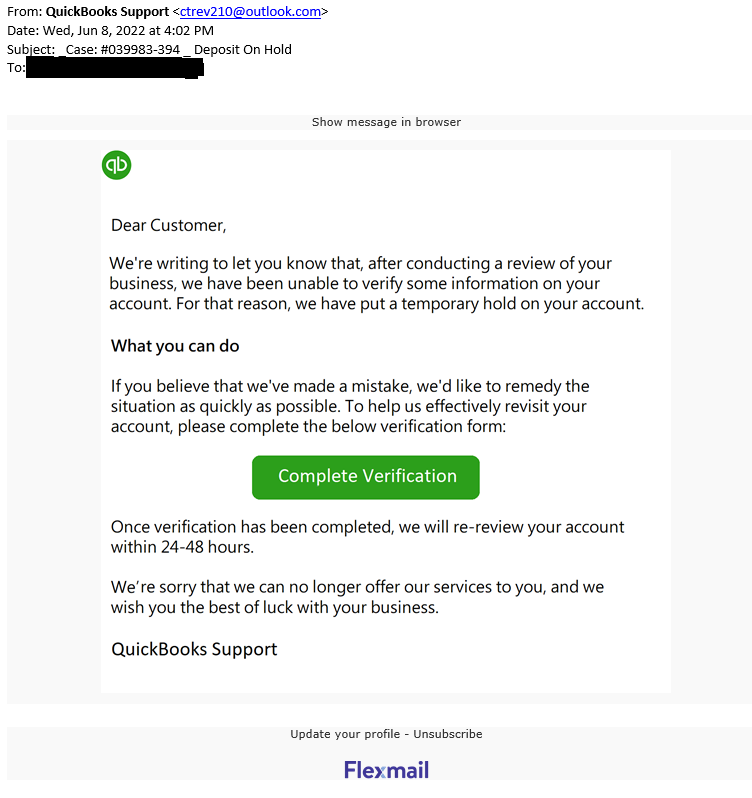
_Case: #039983-394 _ Deposit On Hold
Phishing is a cybercrime aimed to lure individuals into revealing personal information or expose the...Phishing is a cybercrime aimed to lure individuals into revealing personal information or expose them to downloads of malware that will infect their computer. Phishing lures will impersonate real companies. They come in various forms including emails, websites and phone calls.
Intuit has recently received reports from customers that they have received emails similar to the one below. This email did not come from Intuit. The sender is not associated with Intuit, is not an authorized agent of Intuit, nor is their use of Intuit's brands authorized by Intuit.
Please don't click on any links or attachments, or reply to the email. We recommend you delete the email. If you have already clicked on a link or downloaded something from the email:
- Delete the download immediately.
- Scan your system using an up-to-date anti-virus program.
- Change your passwords.
For more information on phishing and how you may protect yourself from phishing, please see our security tips.
Thank you for being a valued customer.
- 25 May 2022
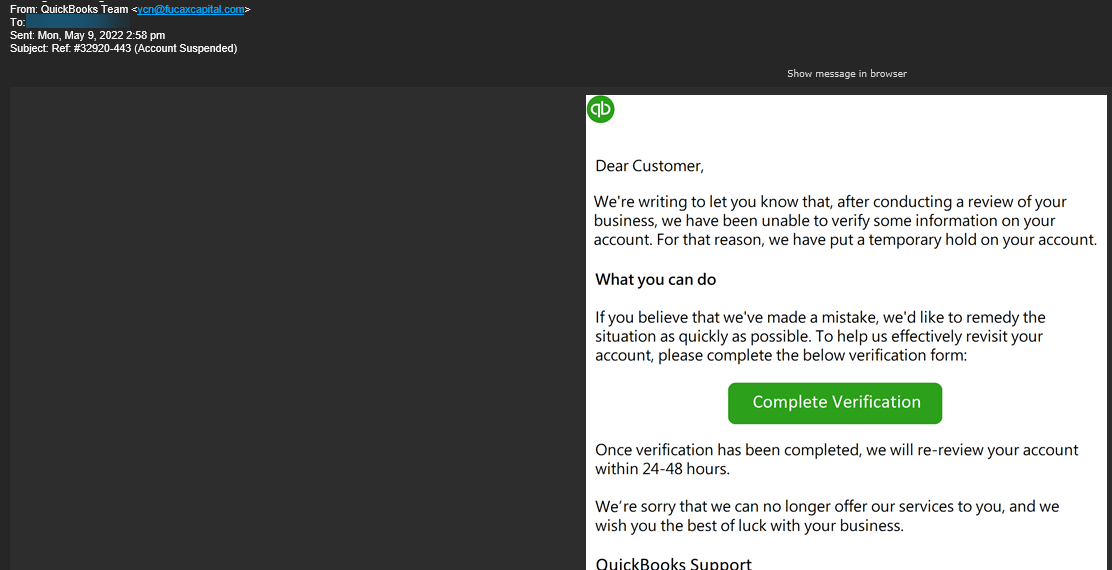
PHISHING EMAIL: Ref: #32920-443 (Account Suspended)
Phishing is a cybercrime aimed to lure individuals into revealing personal information or expose the...Phishing is a cybercrime aimed to lure individuals into revealing personal information or expose them to downloads of malware that will infect their computer. Phishing lures will impersonate real companies. They come in various forms including emails, websites and phone calls.
Intuit has recently received reports from customers that they have received emails similar to the one below. This email did not come from Intuit. The sender is not associated with Intuit, is not an authorized agent of Intuit, nor is their use of Intuit's brands authorized by Intuit.
Please don't click on any links or attachments, or reply to the email. We recommend you delete the email. If you have already clicked on a link or downloaded something from the email:
- Delete the download immediately.
- Scan your system using an up-to-date anti-virus program.
- Change your passwords.
For more information on phishing and how you may protect yourself from phishing, please see our security tips.
Thank you for being a valued customer.
- 28 April 2022
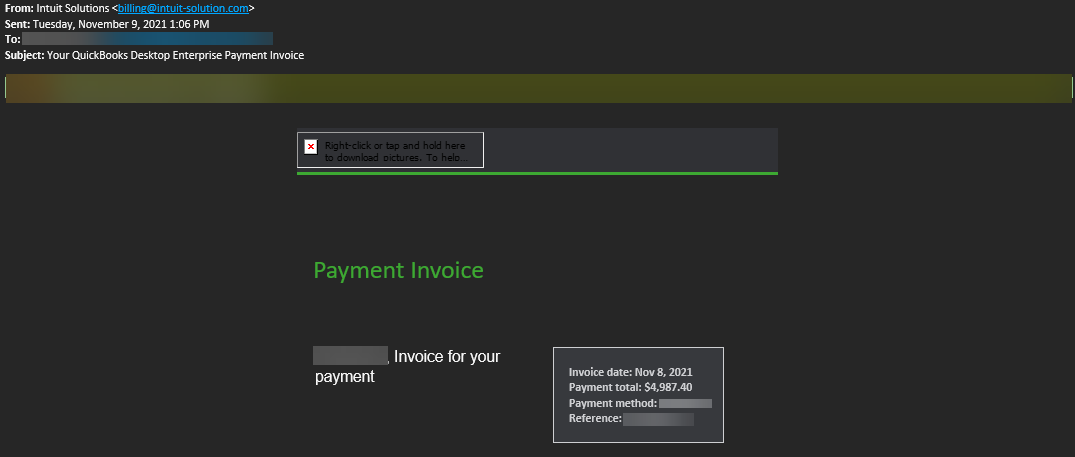
PHISHING EMAIL: Your QuickBooks Desktop Enterprise Payment Invoice
Phishing is a cybercrime aimed to lure individuals into revealing personal information or expose the...Phishing is a cybercrime aimed to lure individuals into revealing personal information or expose them to downloads of malware that will infect their computer. Phishing lures will impersonate real companies. They come in various forms including emails, websites and phone calls.
Intuit has recently received reports from customers that they have received emails similar to the one below. This email did not come from Intuit. The sender is not associated with Intuit, is not an authorized agent of Intuit, nor is their use of Intuit's brands authorized by Intuit.
Please don't click on any links or attachments, or reply to the email. We recommend you delete the email. If you have already clicked on a link or downloaded something from the email:
- Delete the download immediately.
- Scan your system using an up-to-date anti-virus program.
- Change your passwords.
For more information on phishing and how you may protect yourself from phishing, please see our security tips.
Thank you for being a valued customer.
- 28 April 2022
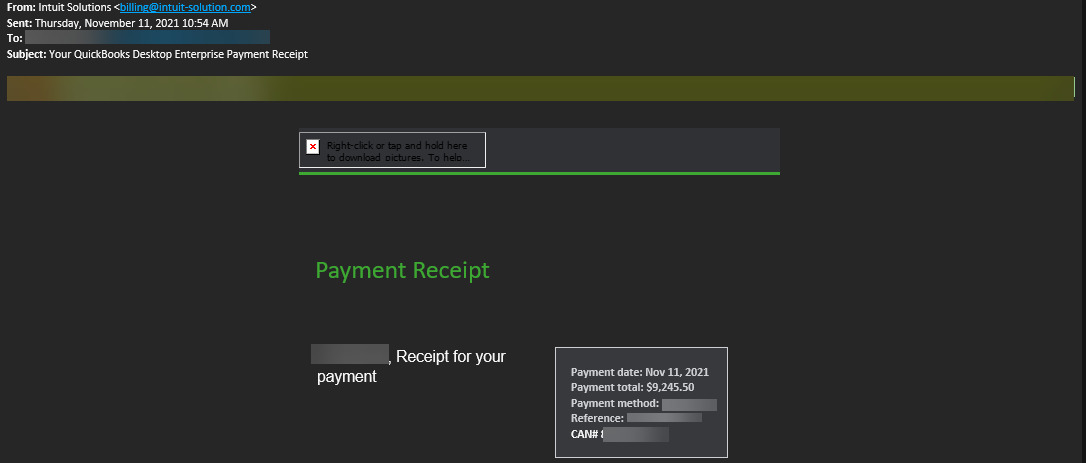
PHISHING EMAIL: Your QuickBooks Desktop Enterprise Payment Receipt
Phishing is a cybercrime aimed to lure individuals into revealing personal information or expose the...Phishing is a cybercrime aimed to lure individuals into revealing personal information or expose them to downloads of malware that will infect their computer. Phishing lures will impersonate real companies. They come in various forms including emails, websites and phone calls.
Intuit has recently received reports from customers that they have received emails similar to the one below. This email did not come from Intuit. The sender is not associated with Intuit, is not an authorized agent of Intuit, nor is their use of Intuit's brands authorized by Intuit.
Please don't click on any links or attachments, or reply to the email. We recommend you delete the email. If you have already clicked on a link or downloaded something from the email:
- Delete the download immediately.
- Scan your system using an up-to-date anti-virus program.
- Change your passwords.
For more information on phishing and how you may protect yourself from phishing, please see our security tips.
Thank you for being a valued customer.
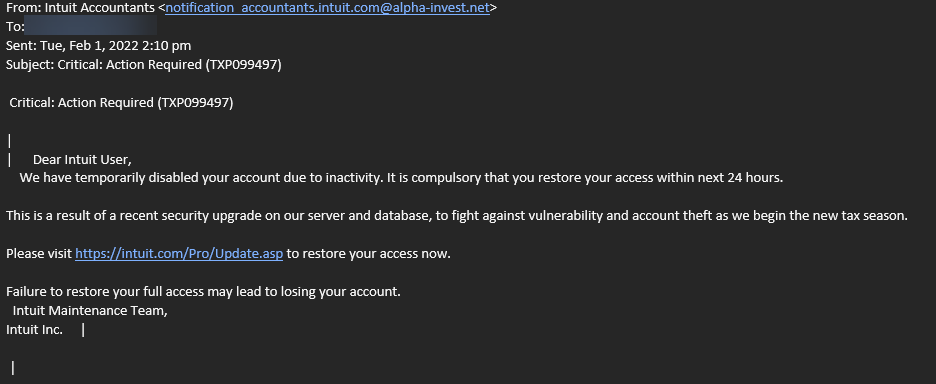
- 3 February 2022
PHISHING EMAIL: Critical: Action Required (TXP099497)
Phishing is a cybercrime aimed to lure individuals into revealing personal information or expose the...Phishing is a cybercrime aimed to lure individuals into revealing personal information or expose them to downloads of malware that will infect their computer. Phishing lures will impersonate real companies. They come in various forms including emails, websites and phone calls.
Intuit has recently received reports from customers that they have received emails similar to the one below. This email did not come from Intuit. The sender is not associated with Intuit, is not an authorized agent of Intuit, nor is their use of Intuit's brands authorized by Intuit.
Please don't click on any links or attachments, or reply to the email. We recommend you delete the email. If you have already clicked on a link or downloaded something from the email:
- Delete the download immediately.
- Scan your system using an up-to-date anti-virus program.
- Change your passwords.
For more information on phishing and how you may protect yourself from phishing, please see our security tips.
Thank you for being a valued customer.
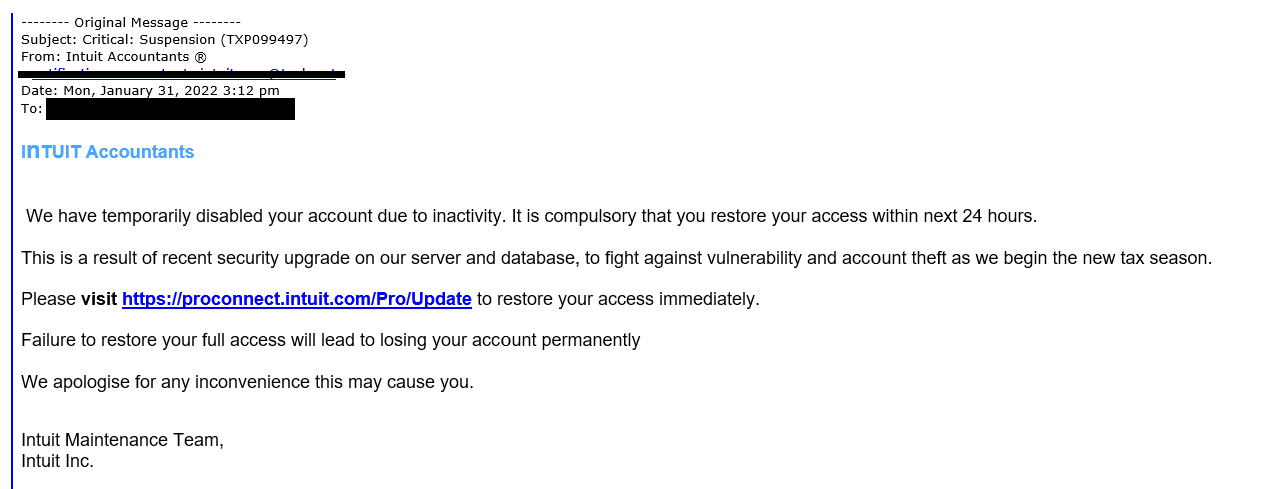
- 1 February 2022
PHISHING EMAIL: Critical: Suspension (TXP099497)
Phishing is a cybercrime aimed to lure individuals into revealing personal information or expose the...Phishing is a cybercrime aimed to lure individuals into revealing personal information or expose them to downloads of malware that will infect their computer. Phishing lures will impersonate real companies. They come in various forms including emails, websites and phone calls.
Intuit has recently received reports from customers that they have received emails similar to the one below. This email did not come from Intuit. The sender is not associated with Intuit, is not an authorized agent of Intuit, nor is their use of Intuit's brands authorized by Intuit.
Please don't click on any links or attachments, or reply to the email. We recommend you delete the email. If you have already clicked on a link or downloaded something from the email:
- Delete the download immediately.
- Scan your system using an up-to-date anti-virus program.
- Change your passwords.
For more information on phishing and how you may protect yourself from phishing, please see our security tips.
Thank you for being a valued customer.
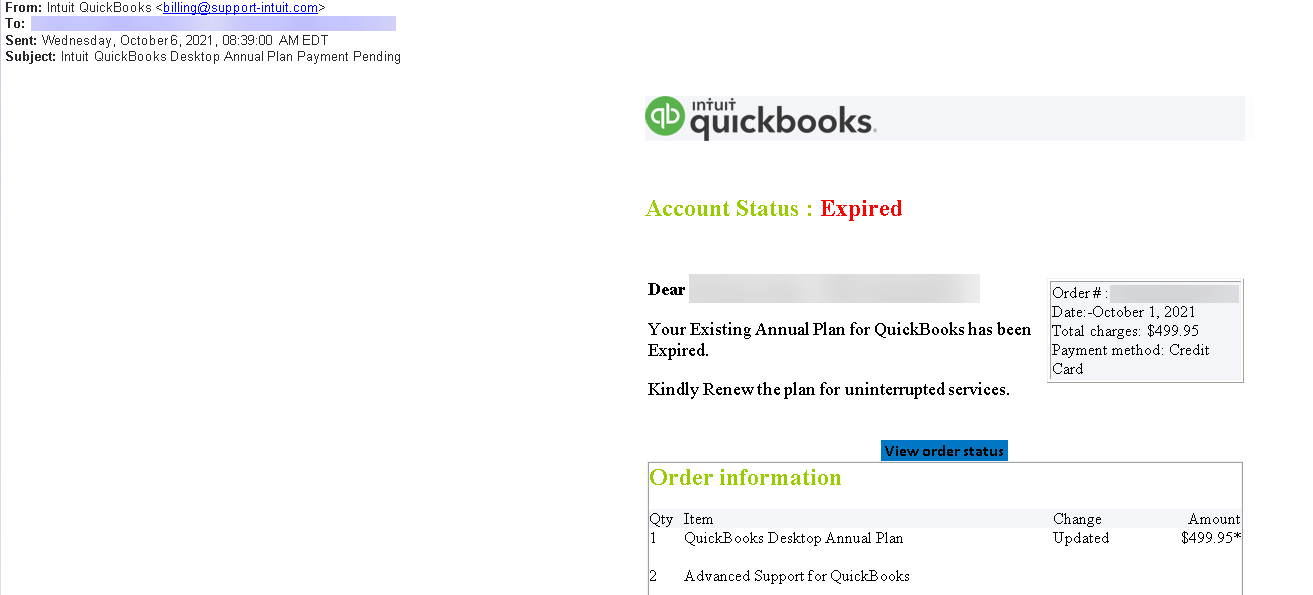
- 6 October 2021
PHISHING EMAIL: Intuit QuickBooks Desktop Annual Plan Payment Pending
Phishing is a cybercrime aimed to lure individuals into revealing personal information or expose the...Phishing is a cybercrime aimed to lure individuals into revealing personal information or expose them to downloads of malware that will infect their computer. Phishing lures will impersonate real companies. They come in various forms including emails, websites and phone calls.
Intuit has recently received reports from customers that they have received emails similar to the one below. This email did not come from Intuit. The sender is not associated with Intuit, is not an authorized agent of Intuit, nor is their use of Intuit's brands authorized by Intuit.
Please don't click on any links or attachments, or reply to the email. We recommend you delete the email. If you have already clicked on a link or downloaded something from the email:
- Delete the download immediately.
- Scan your system using an up-to-date anti-virus program.
- Change your passwords.
For more information on phishing and how you may protect yourself from phishing, please see our security tips.
Thank you for being a valued customer.
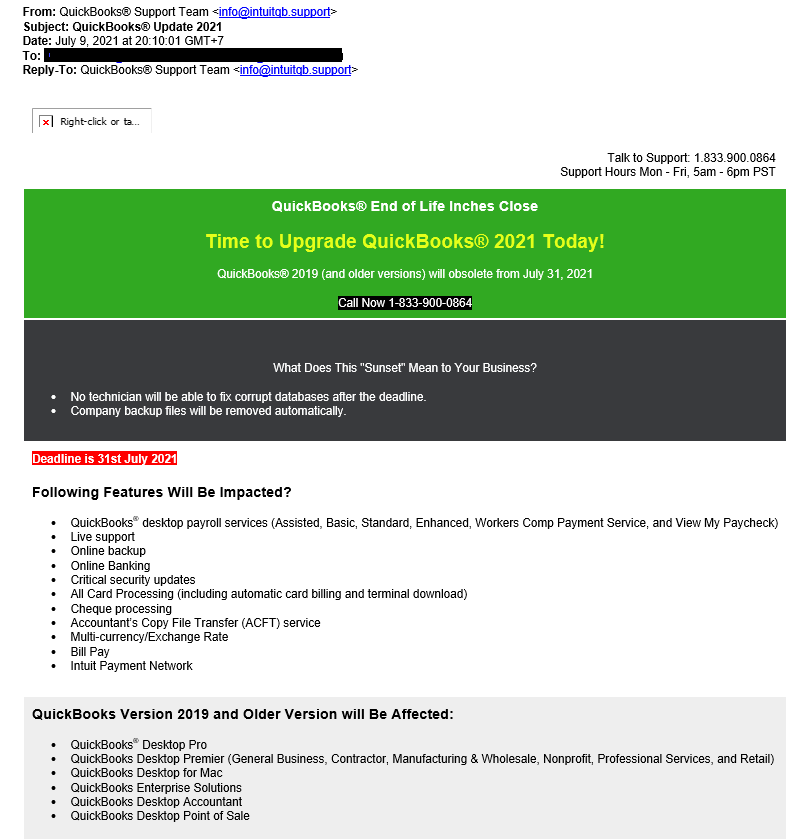
- 12 July 2021
PHISHING EMAIL: QuickBooks® Update 2021
Phishing is a cybercrime aimed to lure individuals into revealing personal information or expose the...Phishing is a cybercrime aimed to lure individuals into revealing personal information or expose them to downloads of malware that will infect their computer. Phishing lures will impersonate real companies. They come in various forms including emails, websites and phone calls.
Intuit has recently received reports from customers that they have received emails similar to the one below. This email did not come from Intuit. The sender is not associated with Intuit, is not an authorized agent of Intuit, nor is their use of Intuit's brands authorized by Intuit.
Please don't click on any links or attachments, or reply to the email. We recommend you delete the email. If you have already clicked on a link or downloaded something from the email:
- Delete the download immediately.
- Scan your system using an up-to-date anti-virus program.
- Change your passwords.
For more information on phishing and how you may protect yourself from phishing, please see our security tips.
Thank you for being a valued customer.
- 19 May 2021
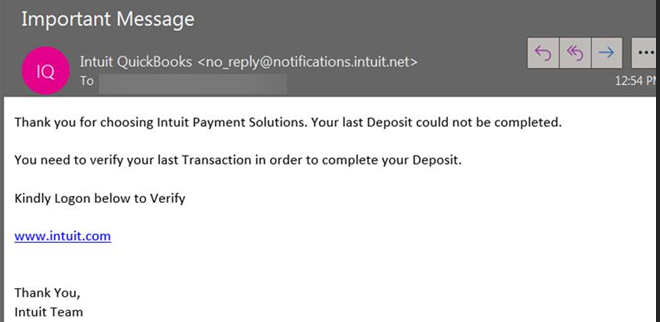
PHISHING EMAIL: Important Message
Phishing is a cybercrime aimed to lure individuals into revealing personal information or expose the...Phishing is a cybercrime aimed to lure individuals into revealing personal information or expose them to downloads of malware that will infect their computer. Phishing lures will impersonate real companies. They come in various forms including emails, websites and phone calls.
Intuit has recently received reports from customers that they have received emails similar to the one below. This email did not come from Intuit. The sender is not associated with Intuit, is not an authorized agent of Intuit, nor is their use of Intuit's brands authorized by Intuit.
Please don't click on any links or attachments, or reply to the email. We recommend you delete the email. If you have already clicked on a link or downloaded something from the email:
- Delete the download immediately.
- Scan your system using an up-to-date anti-virus program.
- Change your passwords.
For more information on phishing and how you may protect yourself from phishing, please see our security tips.
Thank you for being a valued customer.
- 3 May 2021
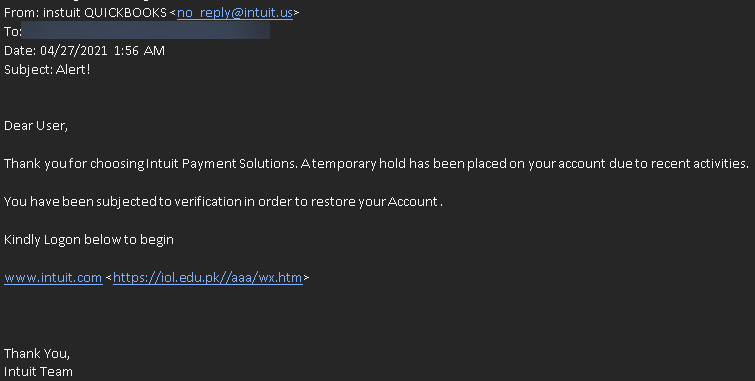
PHISHING EMAIL: Alert !
Phishing is a cybercrime aimed to lure individuals into revealing personal information or expose the...Phishing is a cybercrime aimed to lure individuals into revealing personal information or expose them to downloads of malware that will infect their computer. Phishing lures will impersonate real companies. They come in various forms including emails, websites and phone calls.
Intuit has recently received reports from customers that they have received emails similar to the one below. This email did not come from Intuit. The sender is not associated with Intuit, is not an authorized agent of Intuit, nor is their use of Intuit's brands authorized by Intuit.
Please don't click on any links or attachments, or reply to the email. We recommend you delete the email. If you have already clicked on a link or downloaded something from the email:
- Delete the download immediately.
- Scan your system using an up-to-date anti-virus program.
- Change your passwords.
For more information on phishing and how you may protect yourself from phishing, please see our security tips.
Thank you for being a valued customer.
Learn more about email scams
Scam emails are designed to trick you into thinking they’re real. Luckily, we have tools to help you avoid falling for email scams. Our security tips can make it easier to spot fake emails.
Let us know about a fake email
If you got a scam email, we want to know about it. Reporting scam emails makes it harder for fraudsters. We share the details we get to help keep you safe.
Know how to avoid customer support scams
These scams try to convince you there’s a problem with your computer and offer to fix it. These fraudsters are really after your money or files. Our security tips can help you avoid fake customer support scams.